MSG ERP Development
Development · Changelog

MSG ERP Development

From the first version on 24 Aug 2026 to today: what each version added, in plain words, with its date. Where screenshots exist, pictures show the state before and after.

This page as of 1 Nov 2026

  • 29versions since launch
  • 69days since 1.0.0
  • 12released as a download
  • 0version in progress

What the labels mean

  • Releasedoffered as a download
  • Complete packageinstaller built, not offered on its own
  • Interim buildpart of the build-up, not delivered on its own
  • Coming soonin progress, not yet delivered
  • In developmentplugin, test versions so far
  • Plannedno date yet

Outlook: plugins

Plugins add to MSG ERP and work with the same data. None has been delivered yet, and there is no date.

In development

MSG ERP Bistro

  • Ordering, kitchen and billing for events, catering, grill and drinks trucks
  • The app exists as test versions so far; none has been delivered yet
  • As an extension in MSG ERP 1.21.0: menu, table plans and invoice numbers come from MSG ERP, closings go back as invoices

See how MSG ERP Bistro is developing · See all plugins

Planned

MSG ERP Website

  • Your own website with your offer, connected to MSG ERP
  • The connection to MSG ERP is a concept so far and will come with a later version

All versions

Newest first. Each card gives the date and what was added; click a picture to open it full size.

  1. 1.27.0

    As of 1 Nov 2026Coming soonReleased

    Website: rental items with texts and pictures on your own website

    • New extension “Website”: put rental items and venues with texts, details and pictures on your company website without maintaining them there a second time
    • On the rental item, the section “Website”: title, text, search terms, features, category, order and pictures, with a preview
    • Rental items: the address and details of an event venue — guests, area, rooms and parking — can now be entered
    • Settings → Website: what goes on the website and what does not, each with the reason, and the order of the categories
    • The current state goes to the website as a file and is read in on its dashboard; the website only accepts packages from your own program
    • On the website, entries from MSG ERP are locked and can only be hidden in an emergency; whatever is missing from a new state is hidden first and removed only after a longer time
    • Prices, customers, documents and personal data never go on the website
    • After the update, version 1.26.0 no longer opens the same data; going back is only possible with the backup made before the update

    Tested on a PC with more than 4,000 automated checks, the conversion of existing data also on PostgreSQL; the website template with its own checks and with packages from MSG ERP. Also delivered in MSG ERP Online.

    Rental item Festsaal am See, section Website: the chosen picture with its description, below it the preview with the place Musterstadt, the details guests up to 120, area 250.5 m², rooms 3, parking 40, the text and three features
    1.27.0 · taken 1 Nov 2026 — The section “Website” on the rental item, with a preview
    Settings, Website: What goes on the website — one item with one picture on the website; below it when an item appears and when it does not
    1.27.0 · taken 1 Nov 2026 — Settings → Website: what goes on the website
    Website dashboard, equipment list: Kühlanhänger, Beamer and Transporter with the badge From MSG ERP; Beamer and Transporter are missing from the new state and hidden; instead of Edit there is only the emergency switch
    1.27.0 · taken 1 Nov 2026 — On the website dashboard, entries from MSG ERP are locked
    Rooms page of the website: Festsaal am See from MSG ERP with two pictures, place Musterstadt, text and the details guests up to 120, area 250.5 m², rooms 3, parking 40
    1.27.0 · taken 1 Nov 2026 — On the website: the hall with pictures and details from MSG ERP
  2. 1.26.0

    As of 1 Nov 2026Coming soonReleased

    Staff: temporary agency permit, deletion proposals, staff on documents

    • Settings, section “Staff”: the permit for temporary agency work with its date, authority and expiry
    • Whoever plans temporary agency work for days no permit covers is asked first — it is only saved after “Plan anyway”
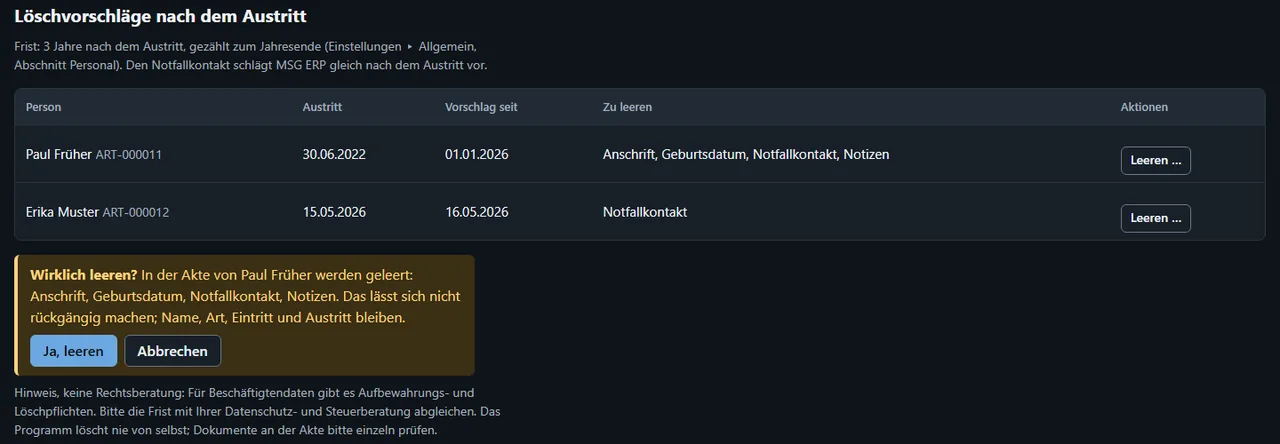
    • Deletion proposals after someone leaves: the emergency contact right away, address, date of birth and notes after the retention period (default three years to the end of the year). Nothing is ever deleted automatically
    • Documents from a reservation or a truck deployment: the planned staff can be chosen beforehand and goes into the draft as its own line, without names
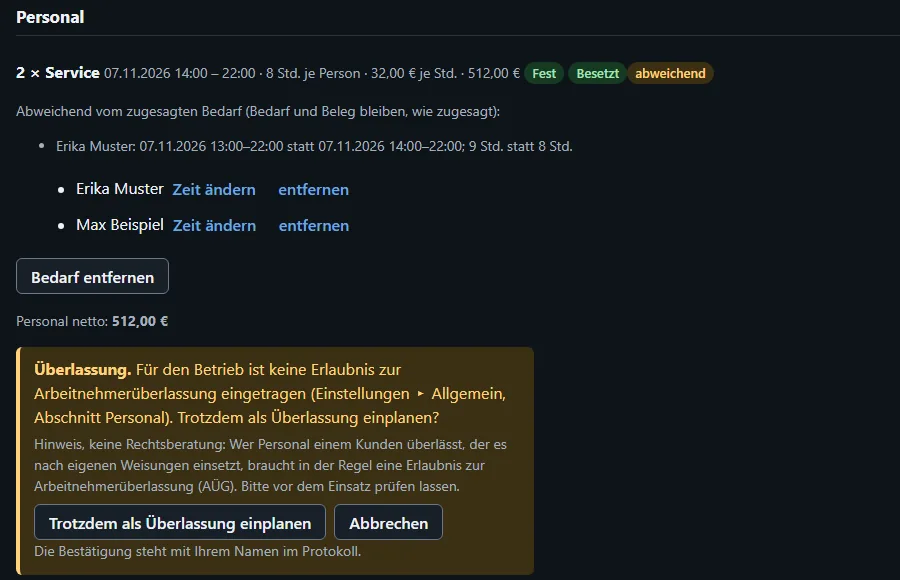
    • If a shift runs differently than promised, the requirement is marked “deviating”; what was promised is still what gets charged
    • In the staff plan, a shift can now also be created for a truck deployment
    • After the update, version 1.25.0 no longer opens the same data; going back is only possible with the backup made before the update

    Tested on a PC with more than 4,000 automated checks, the conversion of existing data also on PostgreSQL. Also delivered in MSG ERP Online.

    General settings, section Staff: permit for temporary agency work granted on 1 March 2025, limited until 28 February 2027, authority Agentur für Arbeit Musterstadt; below it the retention period of the deletion proposals, three years
    1.26.0 · taken 1 Nov 2026 — The temporary agency permit in the settings
    Staff panel at an event: requirement 2 × service marked deviating, with the line Erika Muster 13:00–22:00 instead of 14:00–22:00; below it the question about temporary agency work without a registered permit and the button to plan anyway
    1.26.0 · taken 1 Nov 2026 — “Deviating” at the requirement and the question about agency work
    Deletion proposals after leaving on the staff page: Paul Früher with address, date of birth, emergency contact and notes, Erika Muster with the emergency contact; below it the question whether to really clear them
    1.26.0 · taken 1 Nov 2026 — Deletion proposals, cleared only after asking
    Reservation: before the invoice, the question whether to put staff on the document, with two ticked lines, service 2 × 8 h at €32.00 and set-up 1 × 3 h at €25.00, with times and net amounts
    1.26.0 · taken 1 Nov 2026 — The staff of a reservation can be chosen before the document
  3. 1.25.0

    As of 1 Nov 2026Coming soonReleased

    Tile symbol, “more than free” notice, appointments at the contact

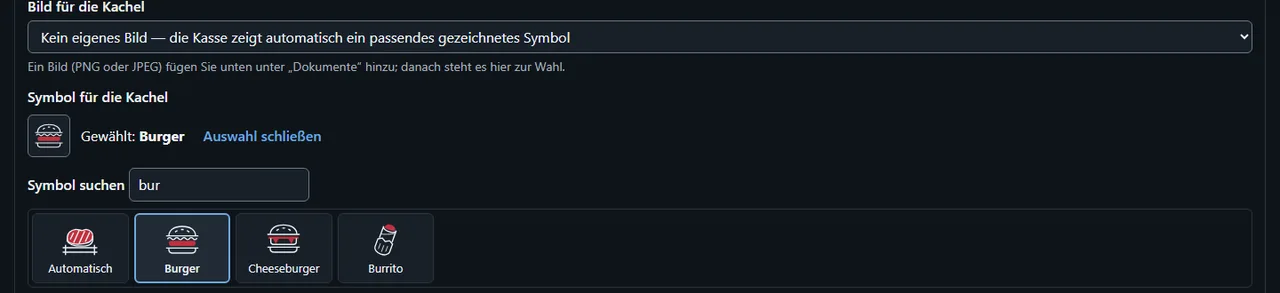
    • The symbol of a tile can be chosen by hand on the item — with a search and “Automatic” as the default. The till preview, the Bistro till from its version 0.7.7 and the guest menu show it
    • Free invoices and free delivery notes: when saving, a notice says if the draft holds more goods than are free in stock
    • The “Appointments” block at a contact also shows its reservations, delivery notes and invoices due
    • Messages about the blocked stock reach every authorised person separately, each with their own “read”
    • The year view of the calendar says “Counting deadlines …” while it is still counting
    • Fixed: the item list and “Goods from stock” at an event stayed empty with very many stock items
    • Fixed: when you switch calendar views quickly, the one you chose last always appears
    • After the update, version 1.24.0 no longer opens the same data; going back is only possible with the backup made before the update

    Tested on a PC with more than 4,000 automated checks, the conversion of existing data also on PostgreSQL. Also delivered in MSG ERP Online.

    Till field group of an item: symbol for the tile, Burger is chosen; below it the search “bur” with the symbols Automatic, Burger, Cheeseburger and Burrito
    1.25.0 · taken 31 Oct 2026 — Choosing the tile symbol by hand
    Page Food with the item pork neck steak: the tile shows the chosen symbol Burger, below it the note that it was chosen on the item under Till
    1.25.0 · taken 31 Oct 2026 — The tile shows the chosen symbol
    Bottom of a draft invoice: totals on the left, on the right the notice “More than free in stock: crate of beer: 50 in the draft, 40 free” and the message that the draft was saved
    1.25.0 · taken 31 Oct 2026 — A notice when the draft holds more than is free
    Appointments block at a contact: a reservation, an invoice due and a delivery note with dates, below them Show more, New appointment and To the calendar
    1.25.0 · taken 31 Oct 2026 — Appointments at a contact with reservation, invoice and delivery note
  4. 1.24.0

    As of 31 Oct 2026Coming soonReleased

    Calendar, tasks and deadlines

    • Overview → Calendar with month, week, day, list and year: your own appointments and deadlines next to everything other areas know — reservations, handovers, events, deliveries, invoices due, holidays and assignments
    • Filter by category; the selection is saved per user, named views can be shared with everyone
    • Appointments for properties, people, contacts, events, reservations, documents, departments and storage locations; if wanted, an appointment blocks properties and people, for example for maintenance or a holiday
    • Repeat daily, weekly, monthly or yearly; change one occurrence, the whole series or everything from here on
    • Tasks with a deadline, a checklist and proof: “Done” is only possible once everything is ticked and — where required — the document is attached; the next task is created automatically
    • 17 templates with their source, for example VAT returns, payroll tax returns, prepayments and the payroll report to the accident insurer — suggestions, not advice; tax deadlines are only shown to those who may see the accounts
    • Reminders and “overdue” as a message in the header, for each person separately; the tile “Today and this week” on the overview; calendar file (.ics) to take along
    • Staff plan: one click on a free cell enters a holiday or creates an assignment; weekly plan for printing
    • Booking plan: set-up, take-down and cleaning hatched as buffer; maintenance leads to its appointment
    • “Add from stock” now also in free invoices and free delivery notes; two programs on the same data never book the same goods or the same person twice
    Tested on a PC with more than 4,000 automated checks, the conversion of existing data also on PostgreSQL. Also delivered in MSG ERP Online.

    Calendar for October 2026 with the filter tree on the left: a weekly Monday meeting, a full Wednesday with a delivery, set-up and a technical rehearsal, a reservation with handover and return, and an overdue deadline on 25 October
    1.24.0 · taken 31 Oct 2026 — The calendar: your own appointments and everything other areas know
    Task list with the tabs Open, Overdue, This week and Done: a fire safety inspection overdue in red, the VAT return for October 2026 due on 10 November 2026, preparing the stocktaking; below it a task from a template
    1.24.0 · taken 31 Oct 2026 — Tasks with a deadline; overdue ones are shown in red
    Form New appointment with title, category, start and end, reminder, links to a person, a reservation and a department, and a weekly repeat
    1.24.0 · taken 31 Oct 2026 — An appointment with links, reminder and repeat
    Booking plan: a projector with a hatched buffer before and after the reservation, the van Transporter X blocked by maintenance on 3 and 4 November
    1.24.0 · taken 31 Oct 2026 — Booking plan with buffer and maintenance
  5. 1.23.0

    As of 31 Oct 2026Coming soonReleased

    One item master, goods from stock

    • One item master under Items → All items: every item can be sold, hired out or both, and kept in stock, as a quantity or as a single piece
    • Existing rental items are taken over as items during the update; reservations, calendars and stock stay valid
    • Rental → Rental items shows the items for hire and, next to them, rooms, vehicles and services
    • Storage locations lie within a property, for example “Hall 2 / Chair rack”; the storage overview groups by property and shows what is booked
    • “Add from stock” in quotes, order confirmations and events: choose the storage location and period, each item shows how many are free — nothing beyond that is added
    • Hire with preparation time before and return time after; sales from the first day
    • Requested goods stay held until “valid until”, become firm with the acceptance and are free again on cancellation or expiry (adjustable)
    • Sold goods leave stock with the delivery note (“delivered”) or, without a delivery note, with the invoice — never twice and never below zero; cancellations and take-backs book them back
    • Return with findings: in order, damaged (into blocked stock) or missing (with a reason)
    • Items, storage and the booking plan show what is booked, for example “150 hired out 15–17 June”

    Tested on a PC with almost 4,000 automated checks, the takeover of existing data also on PostgreSQL. Also delivered in MSG ERP Online.

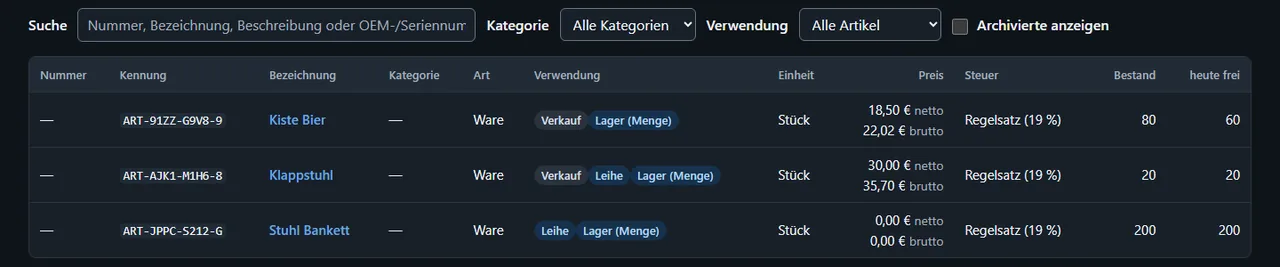
    List Items and services with the columns Use, Stock and Free today: a crate of beer for sale from stock, a folding chair for sale and hire, a banquet chair for hire with a stock of 200
    1.23.0 · taken 31 Oct 2026 — One item master: sale, hire and stock on one item
    Booking plan from 14 June with the banquet chair: 150 of 200 from 15 to 17 June, 30 of 200 on 21 and 22 June, 50 reserved on 24 June; below it the list Goods from stock
    1.23.0 · taken 31 Oct 2026 — Booking plan with goods from stock
    Quote with three lines from stock: 12 crates of beer and 4 folding chairs for sale, 30 banquet chairs for hire from 15 to 17 June; below it the selection with storage location Hall 2 / Chair rack and period
    1.23.0 · taken 31 Oct 2026 — “Add from stock” in the quote: choose storage location and period
    Selection Add from stock with 250 banquet chairs requested; message: only 50 banquet chairs are free on 15–17 June, nothing was added
    1.23.0 · taken 31 Oct 2026 — MSG ERP never adds more than is free
  6. 1.22.0

    As of 30 Oct 2026Coming soonReleased

    Staff

    • New area Operations → Staff: employees, temporary staff, contractors and helpers with their own staff file — qualifications with expiry, documents, appointments, holidays and absences
    • Specially protected details such as address, date of birth and emergency contact are visible only to those with the right to see them
    • Existing employees are taken over as staff during the update, their reservations stay valid; contacts can be taken over as staff
    • Assignments to quotes, events, reservations and van deployments: MSG ERP reports overlaps with other assignments, holidays or reservations and never books anyone twice
    • Create a need without a person and fill it later, with a list of open needs
    • Staff as a line in the quote: hours times rate with tax; accepting the quote confirms the assignments, a cancellation frees the people again
    • Staff plan by week and month, tile “On duty today” on the overview, staff as their own lane in the booking plan
    • Choose the contact person on documents from your staff; people no longer get a label
    • Bistro extension: the preview of the till tiles shows a drawn symbol for items without a photo

    Tested on a PC with almost 3,900 automated checks, the takeover of existing data also on PostgreSQL. Also delivered in MSG ERP Online.

    Quote with a buffet and the line Service staff, 2 × 8 hrs at 32.00 €, totals per tax rate, below it the staff section with one of two places filled
    1.22.0 · taken 30 Oct 2026 — Staff in the quote: hours times rate, tax per rate, the assignment below
    Staff plan for the week: four people with assignments and their source, a full-day holiday and free days
    1.22.0 · taken 30 Oct 2026 — Staff plan: who works where and when
    Message Not available: Erika Muster already has an assignment as service staff at the same time; buttons Plan anyway and Cancel
    1.22.0 · taken 30 Oct 2026 — Planning checks the calendar and reports overlaps
    Booking plan with rental items and below it the separate lane Staff with assignments and holidays
    1.22.0 · taken 30 Oct 2026 — Booking plan: staff as their own lane
  7. 1.21.0

    As of 28 Oct 2026Coming soonReleased

    Extensions, Bistro and serial numbers

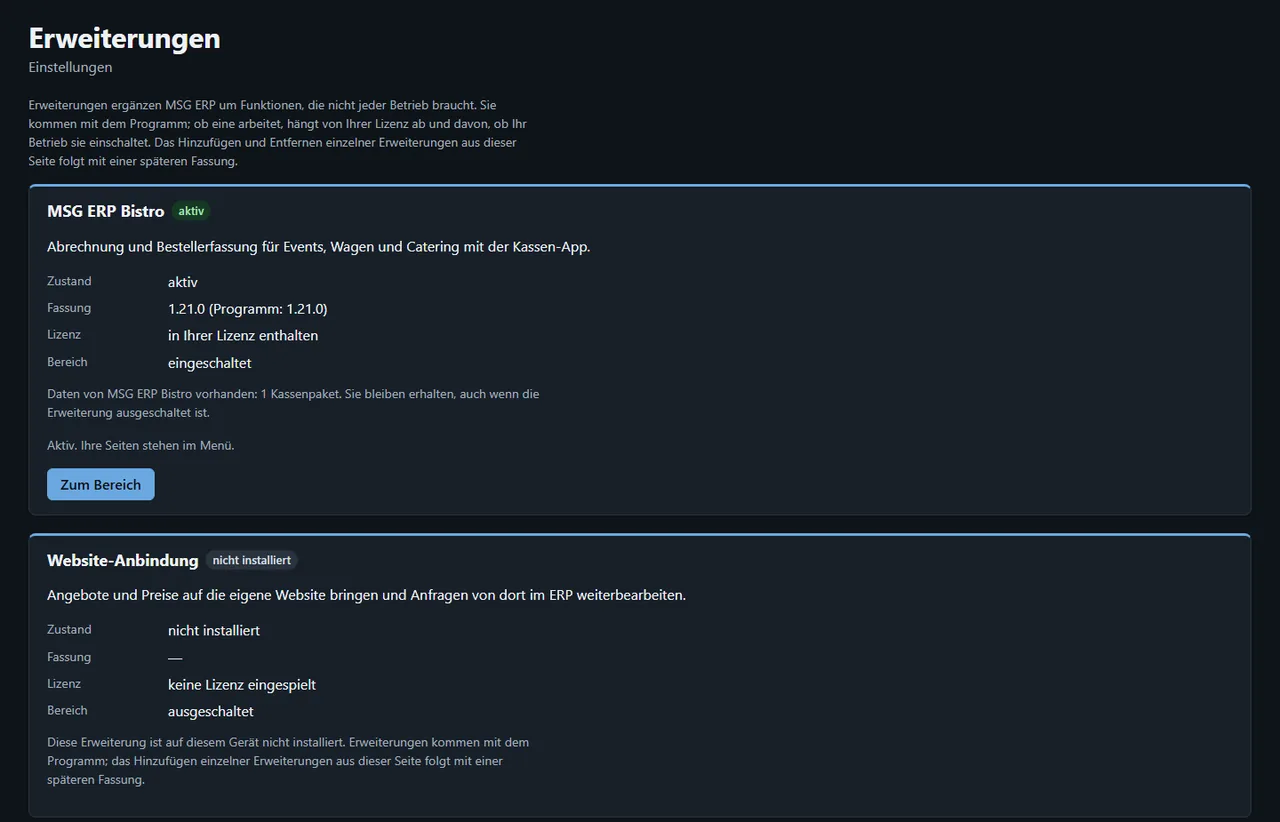
    • New page Settings → Extensions: add-ons such as Bistro can be switched on per business, your data stays even when switched off
    • Bistro extension: create a till package for MSG ERP Bistro right at the event or truck deployment, from the attached menu card
    • Dishes without allergen details are left out of the till package; MSG ERP names them before creating it
    • Invoice numbers for the till: MSG ERP hands over a number block and never issues these numbers a second time, not even after a restore
    • Approve tills with one file, “Tills” overview with packages per event, Bistro settings with payment methods
    • Articles: till details (tax rate for take-away, repeated tap) only appear with the Bistro extension
    • OEM and serial numbers on the data sheet of articles, rental items and equipment; scanning finds them, with a list when there are several matches
    • Rental items on the tablet as a clear card list
    • Read in till closings: every receipt becomes a finalised invoice with the till’s number, cancellations become invoice corrections, nothing is booked twice
    • Before reading in, MSG ERP shows what would be booked: totals per tax rate and payment method, counter-receipts and new customers
    • Till suggestions — new contacts, prices, pictures — are taken over one by one; unused invoice numbers can be marked as “not issued”
    • Table plans: templates with areas, tables and a drawn plan go to the till with the till package
    • Overview: tile “Till closing waiting for import” when no closing has been read in after an event
    • Times are shown in the business’s time zone everywhere, also in MSG ERP Online

    Also delivered in MSG ERP Online. Tested on the tablet with the MSG ERP Bistro till: till package out, sales, closing back and read in as invoices.

    Extensions page with the cards MSG ERP Bistro (active) and website connection
    1.21.0 · taken 27 Oct 2026 — Settings → Extensions: Bistro active, website connection not yet installed
    Bistro section on an event with the button to create a till package and the note missing: soup of the day
    1.21.0 · taken 27 Oct 2026 — Event: create a till package, with a note about a dish without allergen details
    Data sheet of an article with the row OEM and serial numbers
    1.21.0 · taken 27 Oct 2026 — Data sheet: OEM number and two serial numbers on an article
    Search with a scanned OEM number and three matches
    1.21.0 · taken 27 Oct 2026 — Search: one OEM number on three records, pick from the list
    Article form with the till section and the choice group size
    1.21.0 · taken 27 Oct 2026 — Article with till details and options (only with Bistro)
    Closings page: chosen closing file with event, receipts, totals per tax rate and payment method
    1.21.0 · taken 27 Oct 2026 — Read in a closing: MSG ERP first shows what would be booked
    Drawing a table plan: terrace plan with tables on grass, settings for table 9 on the right
    1.21.0 · taken 27 Oct 2026 — Draw a table plan: drag and turn tables, set the seats
  8. 1.20.0

    As of 27 Oct 2026Coming soonReleased

    Hospitality with menu cards

    • Menu cards: one card for quote, order confirmation, invoice, event and truck deployment; attaching makes a copy, so sent or finalised documents never change with it
    • Hospitality menu with menu cards, dishes, drinks, categories, dish attributes and trucks
    • Dishes and drinks with sales details: text, favourite, print kitchen ticket, station, course, colour on the category
    • Article options: choices such as how well done, extras with a surcharge, deposit
    • Text blocks are now called “Text before the items” and “Text after the total”, with a note on where they appear in the PDF
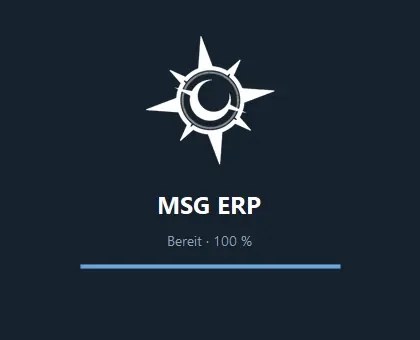
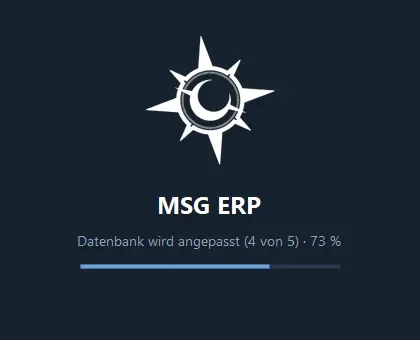
    • Windows program: start screen with the Midnight Sun emblem and a loading bar showing real progress in percent

    Also delivered in MSG ERP Online.

    Hospitality menu (Gastronomie) in 1.19.0 with the trucks and menus page
    Before1.19.0 · 26 Oct 2026 — “Gastronomie” (hospitality) → “Wagen und Karten” (trucks and menus): create a truck, deployments, records
    Menu cards in 1.20.0: card Grill buffet with tiles for bratwurst, neck steak and potato salad
    After1.20.0 · taken 26 Oct 2026 — Menu cards: card “Grill buffet” with dishes and drinks, price per portion
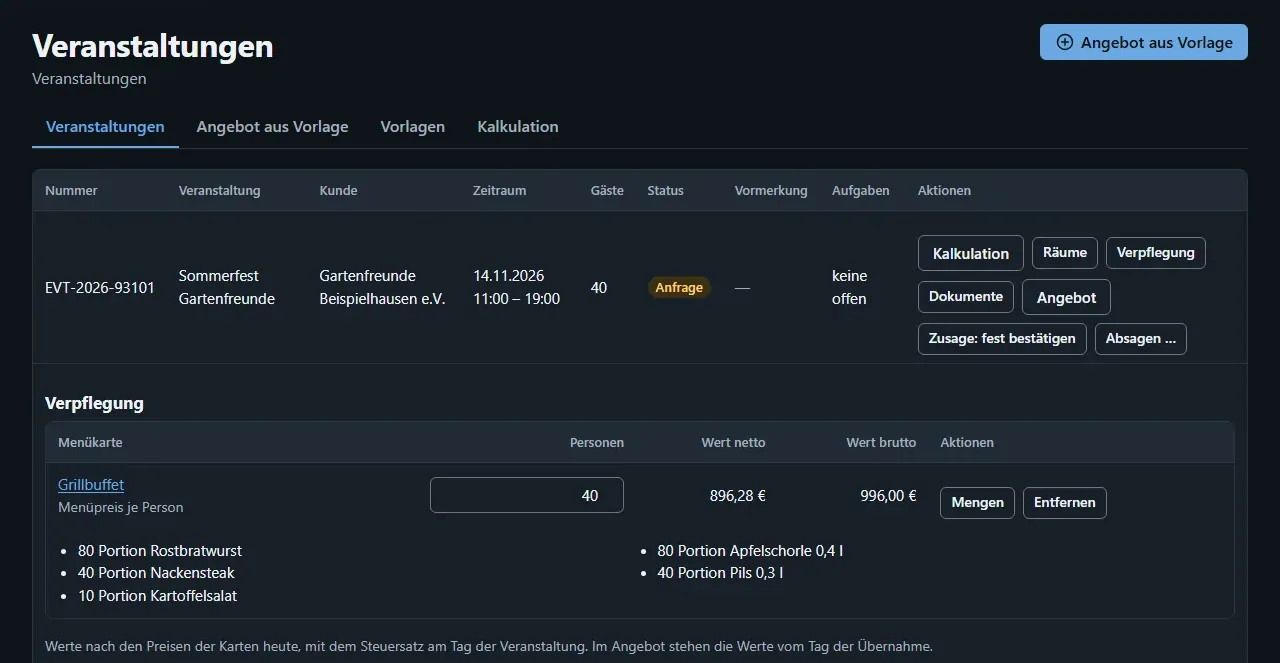
    Event list with catering section and attached menu card
    1.20.0 · taken 27 Oct 2026 — Event with catering: menu card for 40 people, quantities, net and gross value, “Add to quote”
    Printed menu card Grill buffet with dishes, drinks, prices and allergens
    1.20.0 · taken 26 Oct 2026 — Printed menu card with prices and allergens
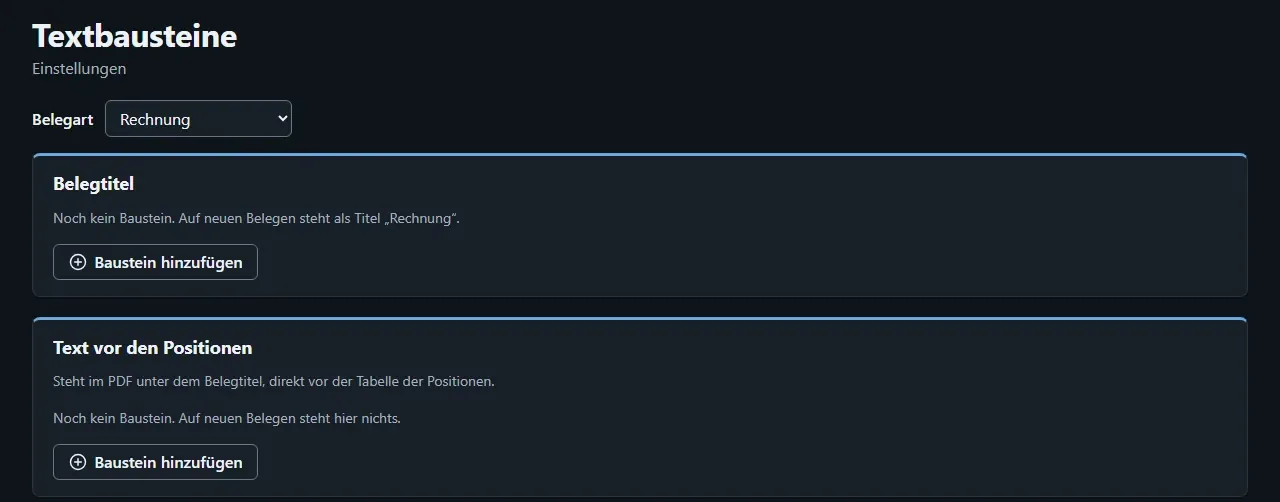
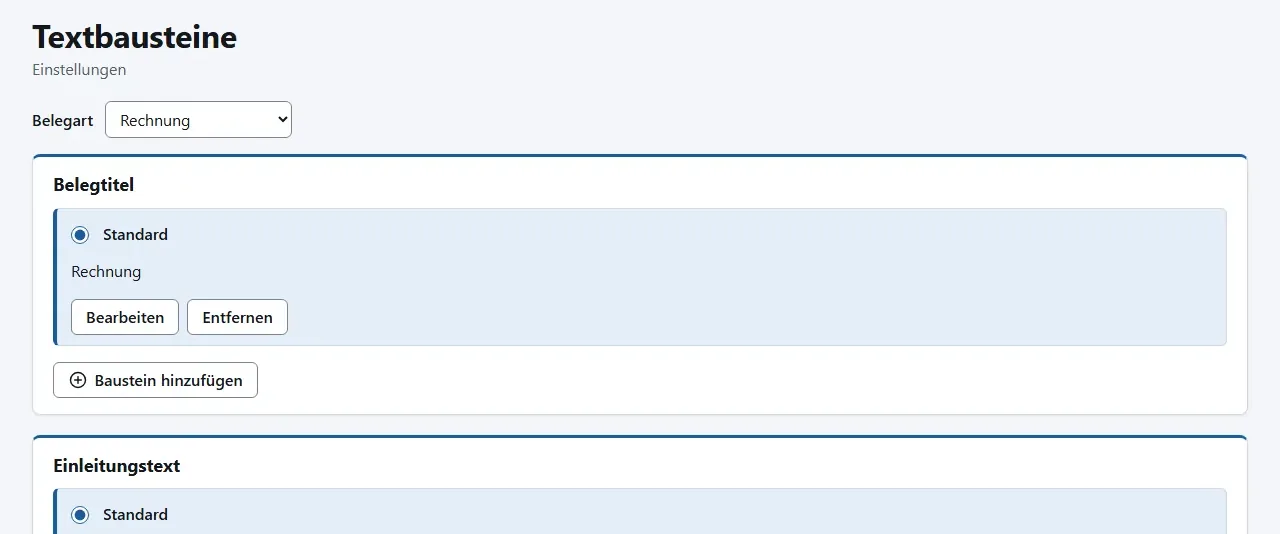
    Text blocks with the old labels document title and introduction
    BeforeTaken 24 Oct 2026 (build-up of 1.2.0) — Text blocks: “Document title” and “Introduction”
    Text blocks with the new label text before the items
    After1.20.0 · taken 27 Oct 2026 — “Text before the items” with a note on where it appears in the PDF
    First start: creating the database · 54 %
    First start: creating the database · 54 %
    After an update: adapting the database (4 of 5) · 73 %
    After an update: adapting the database (4 of 5) · 73 %
    Ready · 100 %
    Ready · 100 %

    Start screen of the Windows program in 1.20.0, taken 27 Oct 2026

  9. 1.19.0

    Released

    Update in the program, gross or net, new menu

    • Install new versions directly in the program with “Update now”, your data stays
    • Stay signed in: the next start only needs your PIN, settings are confirmed with the PIN
    • Enter prices in quotes and invoices gross or net as you prefer; both prices are shown on the article
    • Document number and “Page x of y” on every page; larger logo, size and position adjustable
    • Contact person from your people on quotes, invoices and delivery notes
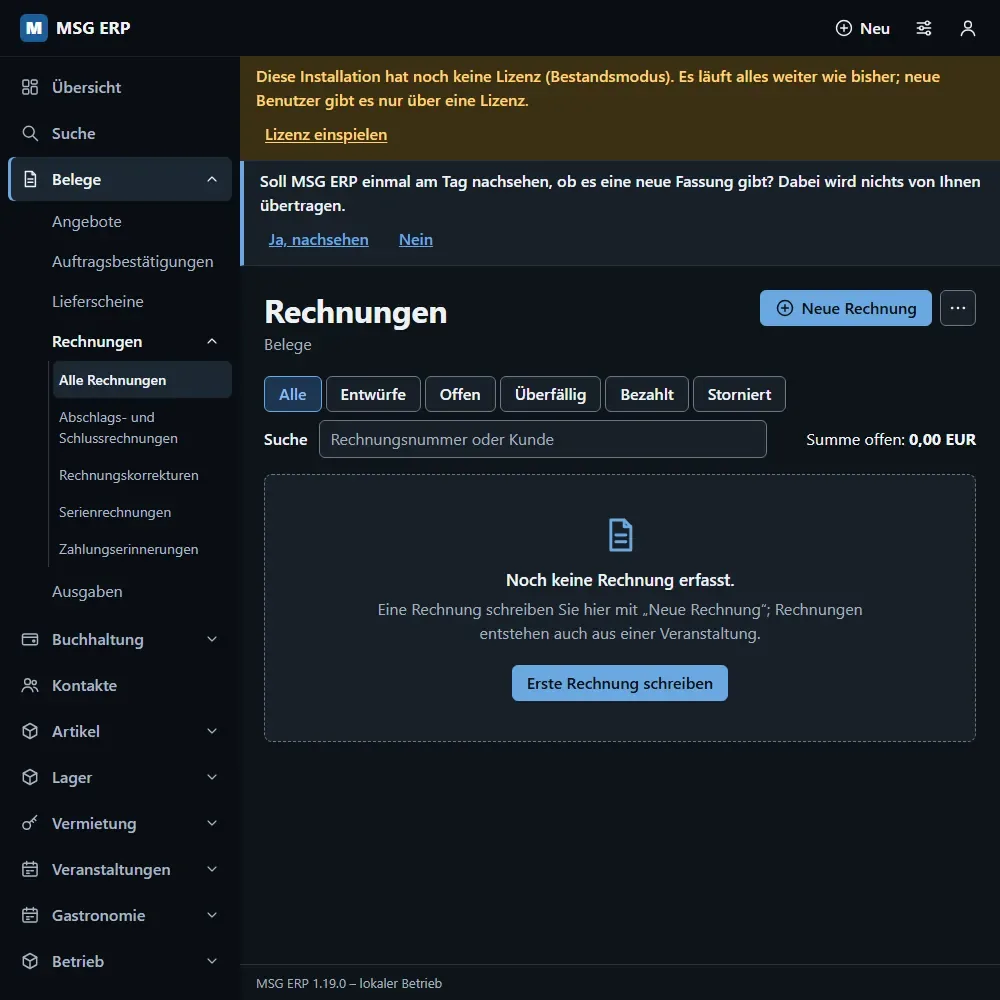
    • New three-level menu, article categories and actions directly in the warehouse view
    • Reserve rooms and rental items in a quote and in an event
    • The Windows installer is repaired

    Also delivered in MSG ERP Online.

    Top bar with the Documents menu open, containing only Invoices
    BeforeDevelopment state 23 Oct 2026 (interface of 1.1.0) — Documents menu with one entry: Invoices
    Sidebar with three-level menu and the empty invoice list
    After1.19.0 · 26 Oct 2026 — Three-level menu: Documents → Invoices → down-payment and final invoices, corrections, recurring, reminders
  10. 1.18.0

    Released

    Update notice and single PC without installation

    • MSG ERP tells you when a new version is available (Settings → Updates)
    • A downloaded file can be checked before installing
    • The industry selection in the setup assistant is easier to read
    • Single-PC installation as a folder, without an installer package and without administrator rights
  11. 1.17.0

    Released

    Warehouse with storage locations

    • Warehouse with storage locations: site, warehouse, area, rack, shelf, bin with a location number
    • Put away, relocate and remove, also by scanning bin and article
    • Pick list in walking order
    • Stocktake per rack with a difference list
    • Blocked stock with a notice and a “Blocked goods” tile
    • Departments with a head and members, workplaces with capacity and staging bin

    First version of the new generation offered as a download on the product page.

  12. 1.16.0

    Interim build

    Identifiers, search and labels

    • A fixed identifier on every record (rental item, article, room, door, document) with a check character
    • Search across everything, also for the hand scanner
    • Operations menu with equipment, objects, people, documents
    • Second codes such as the manufacturer number (GTIN), serial number or an old sticker
    • Print labels with QR code, barcode or data matrix, 24 per A4 sheet
  13. 1.15.0

    Complete package

    Documents on everything

    • Documents attached to contacts, articles, documents and every other object, with date and subject
    • Documents can be marked invalid instead of deleted
    • Print documents directly from the program
    • Documents are part of the data backup, including the second backup folder
  14. 1.14.0

    Interim build

    Security for access from the internet

    • Two-factor sign-in with an authenticator app in the web interface, adjustable: off, required for administrators, or required for everyone
    • Throttling at sign-in against repeated guessing
    • Hardening of the web interface for access from the internet
    • Foundation for MSG ERP Online: its own address per business
  15. 1.13.0

    Interim build

    Snack and drinks trucks

    • Snack and drinks trucks with menu, deployment, billing and records
    • Dietary forms and dish attributes
  16. 1.12.0

    Interim build

    Accommodation and calculation

    • Accommodation: rooms and apartments, short and long stay
    • Calculation with forecast for events
    • Access for the length of stay: the room card is valid only from arrival to departure
  17. 1.11.0

    Complete package

    Occupancy plan and events

    • Occupancy plan and reservations on screen
    • Provisional hold, deposit, handover and return report, and the path to the document
    • Event list and event templates (for example catering, conference, meeting)
    • Quote from template with equipment areas and quantity rules
    • The whole path works in the Windows program and the browser; tablet and phone follow
  18. 1.10.0

    Interim build

    Tailoring per business

    • Show or hide areas of the program
    • Industry templates (for example events and rental, catering, trade and warehouse) can be combined
    • My view: each person hides what they do not need
    • The program suggests but never hides anything silently; export and accounting always count everything
  19. 1.9.0

    Interim build

    Easier start

    • Setup assistant for the first start
    • Import contacts and articles from a CSV file
    • Demo company with invented data to try things out
  20. 1.8.0

    Interim build

    Accounting

    • Journal of postings
    • VAT evaluation
    • Cash-basis profit statement
    • Open items
    • Export for your tax adviser’s bookkeeping
    • The manual says clearly: MSG ERP does not replace tax advice
  21. 1.7.0

    Complete package

    E-invoicing

    • Receive e-invoices: read and check incoming e-invoices
    • Issue e-invoices
    • Notes on obligations and deadlines in the manual, expressly not tax advice
  22. 1.6.0

    Interim build

    More document types

    • Delivery note
    • Down-payment invoice and final invoice
    • Correct an invoice in parts
    • Recurring invoices that are created as drafts and finalised only after you have checked them
    • Create a quote from an earlier quote
  23. 1.5.0

    Interim build

    Bank transactions, cash discount, cash book

    • Read bank transactions from a file you download from your bank, match payments and book only after you confirm; no online banking
    • Write off cash discount and small remainders, with the tax reduced accordingly, to the cent
    • Cash book as a cash journal with receipt files
    • Export for your tax adviser extended by revenue reductions and the cash book
  24. 1.4.1

    Interim build

    Polish for invoices

    • Take back a payment on an invoice
    • Invoice correction shown with a minus sign in list and detail
    • Links below the message when finalising that lead to the matching setting
    • Tax section under company data and an adjustable payment sentence for invoices without payment terms
  25. 1.4.0

    Interim build

    Fixed amounts, export, backup

    • Amounts are fixed when a document is finalised: a finalised document never changes by a cent
    • The year in the invoice number follows the invoice date, with a prompt if the date is outside the current year
    • Export for your tax adviser: sales ledger, expense ledger and all document PDFs for month, quarter, year or a custom period
    • Backup page with recent backups, “Back up now” and a second backup folder
    • Send documents by e-mail through your own mail server (Settings → E-mail)
    • The program makes a backup by itself before every database change
  26. 1.3.0

    Interim build

    Quotes, expenses, business figures

    • Write quotes and order confirmations freely: quote to order confirmation to invoice; duplicates only after a confirmation
    • Contacts are customer, supplier or both, with their own supplier number
    • Record expenses: net, by category and cost centre
    • Payment reminder as a PDF without fees, with the reminder level shown on the invoice
    • Overview with business figures: revenue, open receivables, of which overdue, expenses; every tile opens the list behind it
  27. 1.2.0

    Interim build

    Writing invoices

    • Write invoices: draft, finalise with a number, duplicate, cancel
    • Invoice list with views, record payments, a dunning run that sends nothing
    • Invoice PDF with company header, logo, bank details and a payment QR code
    • Articles with unit price, unit and article number alongside the rental items, plus the manufacturer barcode (GTIN)
    • Business settings: company data with logo, bank accounts, number ranges, text blocks, tax keys with validity periods
    • Data backup for single-PC installations

    The business settings were added on the same day; placing them in 1.2.0 is our best assignment.

    Sample invoice with a logo top right, address, items and totals
    Taken 24 Oct 2026 (build-up of 1.2.0) — Invoice PDF with company header and logo, address, items and totals
  28. 1.1.0

    Complete package

    New interface, licence and PIN

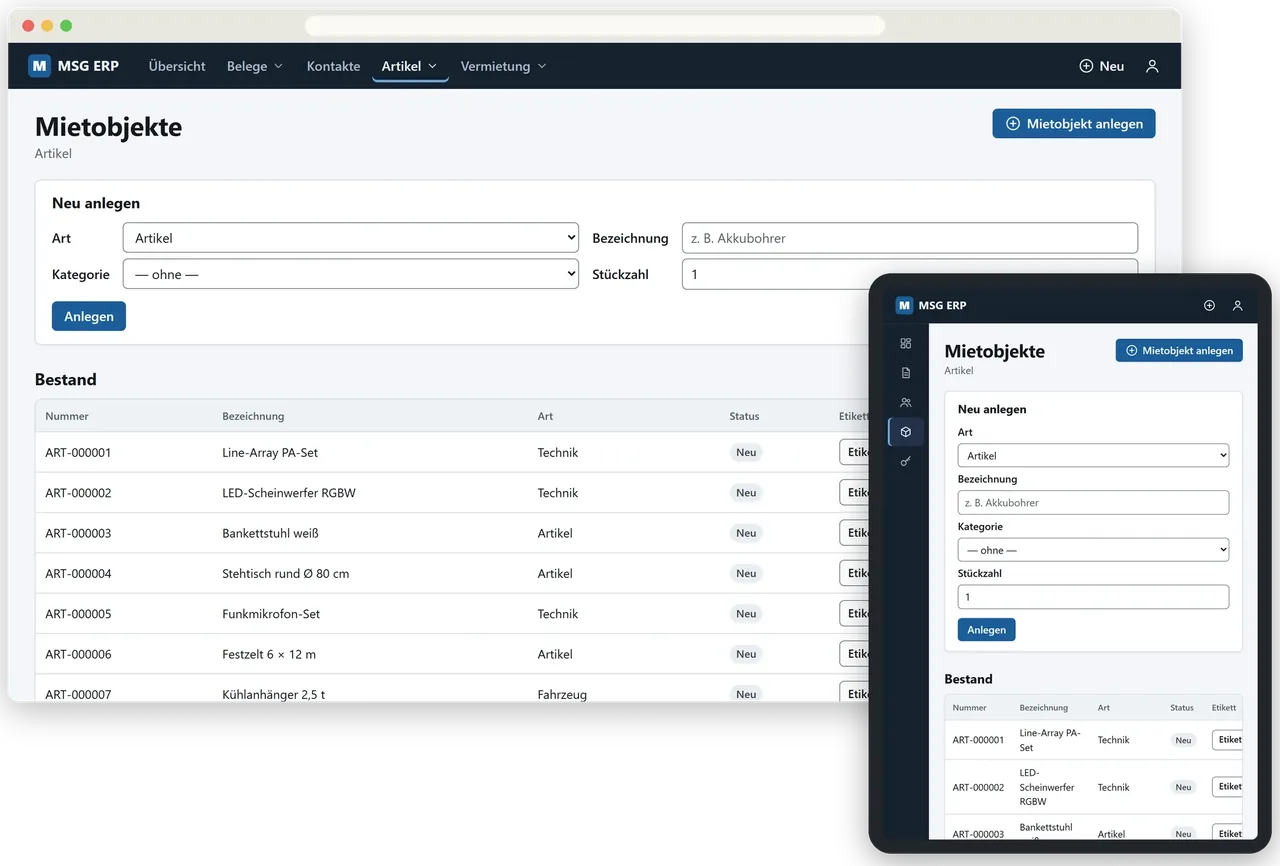
    • New interface: main bar with menus and ⊕ New, light and dark following the device setting, adapts to phone, tablet and PC
    • Windows program with the same pages as the web interface, with a Start menu entry and desktop icon
    • Tablet app without a server, with the same pages
    • Licence file: sign in with the e-mail address and master password from the licence letter, accounts come from the licence
    • Legacy mode for installations without a licence, and a demo licence (one person, usually one week, then read and export only)
    • PIN per device: tap your name, enter the PIN; settings and administration ask for a confirmation
    • Upgrading from 1.0.0: a backup is made before the switch, your data stays
    MSG ERP in the browser and on the tablet: create form and stock list of rental items
    Interface of 1.1.0 · taken 23 Oct 2026 — Rental items in the browser and on the tablet, with invented data
    Tablet portrait: sign-in with fields for user name and password
    BeforeDevelopment state 23 Oct 2026 — Sign-in with user name and password
    Sign-in with name tiles for three invented people
    After1.1.0 · 24 Oct 2026 — Tap your name, then PIN — “Sign in with password” remains available
  29. 24 Aug to 23 Oct 2026: two months without a new version. From 23 Oct 2026 the new interface was built and shipped with 1.1.0. There are hardly any screenshots of 1.3.0 to 1.18.0 themselves; the pictures at 1.1.0 and 1.2.0 date from 23 and 24 Oct 2026.

  30. 1.0.0

    Released

    The first version

    • Rental items and stock: halls, equipment, vehicles, consumables; every stock change is a booking with a reason
    • Reservation with set-up time: set-up, teardown and cleaning are part of the booking, ten booked hours block twenty, double bookings are rejected
    • Events from enquiry through option to completion
    • Quotes and invoices built from blocks, with part payments, credit notes and a dunning run
    • Costs and cost centres: material, temporary staff, cleaning recorded net and assigned per cost centre
    • Door access by card with profiles per door, time windows and a log that includes refused attempts
    • Installation on Windows and on a Linux server; a verified backup before every update
    • Issue and return in the phone interface for warehouse and hall

    The product page and the first packages went online on 23 Aug 2026; the revised 1.0.0 with its manual followed on 24 Aug 2026. There are no screenshots of this version; its manual had no pictures.

About this page

  • All pictures show invented sample data (for example “Sonnenhof Events GmbH”, “Beispiel AG”, “Anna Berger”).
  • Captions give the version and the day the picture was taken. “Development state” means: taken before the version was finished.
  • Interim builds were not delivered on their own. Anyone downloading today gets all of their features with the current version.
  • Dates come from the manual and the version list. For interim builds we give the day only.
  • MSG ERP does not replace tax advice. The notes in the manual are not legal advice.
  • The program itself is in German; the screenshots therefore show German labels.
↑ Versions